Smash Karts Unblocked

Smash Karts Unblocked

Play free on any device — school Chromebook, home PC, or tablet. No download, no install, no signup. Same game, zero blockers.

Works at School No Download Free to Play No Sign-Up
Loading game…
Tested working on Chromebook (ChromeOS 120+), Chrome desktop, Edge, Firefox.

How to Play Smash Karts on a School Chromebook

How to Play Smash Karts on School Chromebook

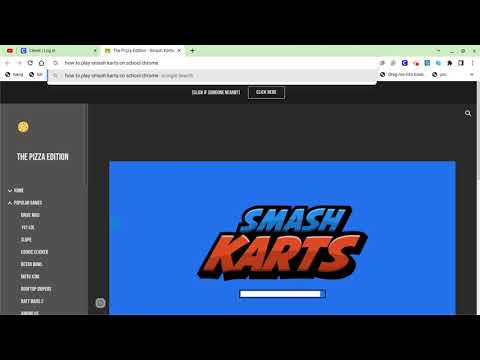
If the game doesn't load on your school network, follow the steps in the video above. Most Chromebooks can run Smash Karts directly in Chrome with no extensions needed — just open the tab and play.

Why Smash Karts Works Unblocked

Browser-Based

Runs on WebGL, right inside your browser tab. There's no install file, no app store, no extension required.
No App Permissions

Nothing to download means nothing for your school's device management to block. Just an open tab in Chrome.

Chromebook Ready

Tested on school-issued Chromebooks running ChromeOS 100 and up. Works in Chrome with no extensions.

Game Not Loading? Try These Steps

Step 1 — Hard refresh the page
Press Ctrl + Shift + R (Windows / ChromeOS) or Cmd + Shift + R (Mac) to force a full reload and clear any cached assets. A regular refresh won't always pick up a fresh copy of the game files.
Step 2 — Check hardware acceleration is on
Smash Karts runs on WebGL, which needs hardware acceleration. On a school Chromebook, some device policies disable it. Go to chrome://settings/system and make sure "Use hardware acceleration when available" is turned on, then relaunch Chrome.
Step 3 — Game loads but you can't join a match
This is almost always a WebSocket block. Smash Karts uses WebSocket connections (wss://) to sync players in real time. Some school firewalls block this protocol even when the game page itself loads fine. If you can see the main menu but get stuck on "Connecting…", your network is filtering WebSocket traffic — not the game URL. Switching to a mobile hotspot will bypass it.
Step 4 — Try a different network
If the steps above don't help, the block is at the network level — not something on your device. Connecting your Chromebook to a phone's mobile hotspot bypasses the school's network filter entirely. The game should load and connect normally on mobile data.
Step 5 — Servers might be down
Smash Karts occasionally has server outages — users have reported getting stuck at the loading screen across Chrome, Edge, and other browsers all at once, with no school filter involved. If nothing else explains the issue, wait 10–15 minutes and try again. It usually clears on its own.

School & Unblocked FAQ

Can I play Smash Karts unblocked at school?
In most cases, yes. Smash Karts runs entirely in the browser with no download, so it doesn't trigger the install-based blocks that many school device policies enforce. Whether the game URL itself is blocked depends on which content filter your school uses and how it's configured — it's a district-level policy, not a universal rule.
Does Smash Karts work on a school Chromebook?
Yes, as long as WebGL and hardware acceleration are enabled. Chromebooks run Chrome natively, and Chrome supports everything Smash Karts needs — no Linux mode, no developer flags, no extensions. If the game won't render, check that hardware acceleration is on in chrome://settings/system.
My school uses GoGuardian — will this work?
GoGuardian is an extension-based filter that blocks sites by category. Whether Smash Karts is blocked depends entirely on how your school has configured it — not all schools using GoGuardian block the same categories. GoGuardian filters the top-level URL in your browser tab; its behaviour with embedded game content can vary. If it's blocked for you, the mobile hotspot workaround in Step 4 above is the most reliable fix.
My school uses Lightspeed — is it different from GoGuardian?
Lightspeed also uses a browser extension (SmartAgent) and filters by domain category, similar to GoGuardian. Some school districts switched from GoGuardian to Lightspeed in 2025–2026. The practical result for gaming sites is roughly the same: category-based blocking that depends on your district's settings. Lightspeed also has screen monitoring features, so teachers may be able to see active tabs.
Will my teacher be able to see I'm playing?
If your school uses GoGuardian Classroom or Lightspeed's monitoring features, yes — teachers can see which tab is active, including the page title and URL. Even if a game isn't blocked, it can still appear on the teacher's dashboard. Playing during free periods or lunch is a different story, but during class it's worth being aware of.
Is Smash Karts Unblocked free?
100% free. There's no paid version — "unblocked" just refers to accessing the game through a domain that isn't filtered by your school. The game itself is identical to the main release, including all game modes, cosmetics, and multiplayer.
Why is Smash Karts blocked at some schools but not others?
School content filters work by assigning websites to categories (Games, Entertainment, Social Media, etc.) and then blocking whichever categories the district has chosen to restrict. Whether Smash Karts is blocked depends on: which filter software your school uses, how it has categorised the domain, and what your IT team has set as policy. Two schools in the same state can have completely different outcomes.
Can I play Smash Karts offline at school?
No. Smash Karts is an online-only multiplayer game — it needs a live internet connection to match you with other players. There's no offline or single-player mode. If your network blocks the game and you don't have mobile data, there's no workaround that keeps you on the school network.